Race Preparation
Creating a Preparation Manually
How to create a race preparation without a start list by entering the details yourself.
When to use the manual option
If the start list is not yet published on o-l.ch, the event is not on o-l.ch at all, or you simply know your start time already, you can create a preparation by entering the details manually.
Creating a manual preparation
- 1Go to Preparation in the sidebar and click "New preparation".
- 2Select "Enter manually" at the top of the page.
- 3Fill in the event details. The event name is required; all other fields are optional.
- 4Add your goals and map notes.
- 5Click "Save preparation".
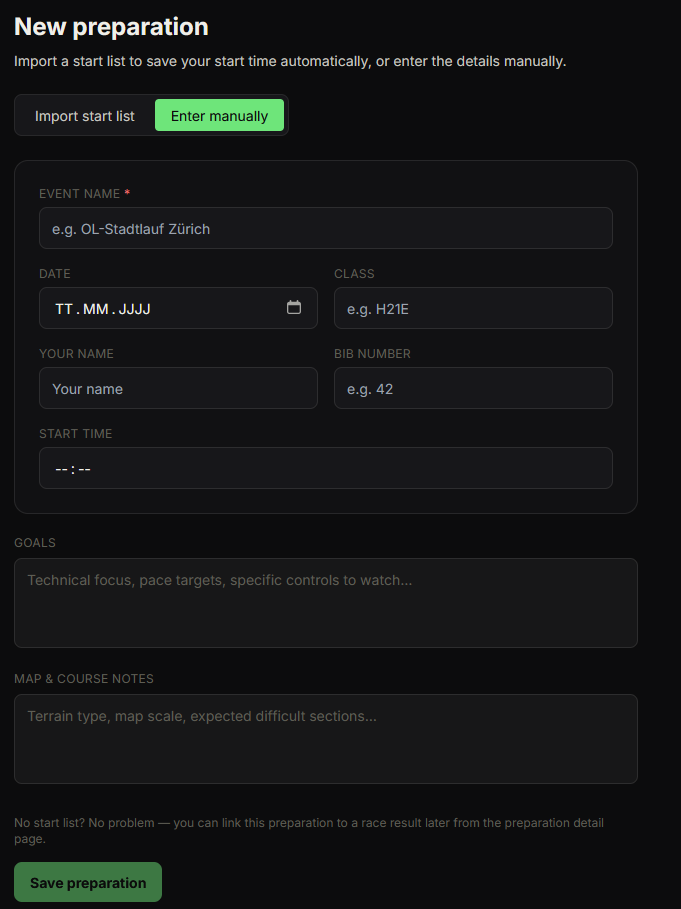
Available fields
- Event name — required. The name of the race.
- Event date — when the race takes place.
- Class — your competition class (e.g. H21E, D18).
- Your name — your name as registered for the event.
- Bib number — your start number.
- Start time — your start time in HH:MM format.
- Goals — your race strategy and objectives.
- Map & Course notes — terrain notes, map scale, known difficult sections.
Linking to a race result later
A manually created preparation starts as "Awaiting result". After you import the race result, you can link the two together manually — see "Linking a Preparation to a Race Result".