Race Analysis
Annotating Legs (Leg Comments)
How to add per-control notes, error types, and severity to your race.
What are leg comments?
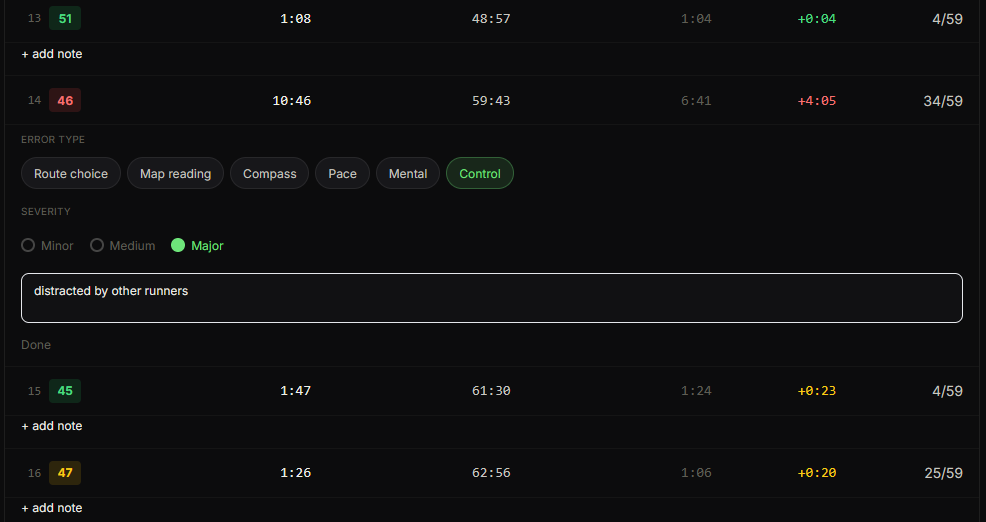
Leg comments let you annotate individual control legs with your own notes directly in the control table. You can describe what happened, categorise the type of error, and rate the severity. This adds a personal layer of context on top of the split-time data.
Adding a comment
- 1Open a race analysis page.
- 2Find the control row you want to annotate and click "+ add note" below it.
- 3The annotation form expands inline below that row.
- 4Optionally select an error type: Route choice, Map reading, Compass, Pace, Mental, or Control.
- 5Optionally select a severity: Minor, Medium, or Major.
- 6Optionally write a free-text note in the text field.
- 7Click "Done" to save.
Editing or removing a comment
Click the annotation area below a control row to reopen the form and edit it. Clear all fields and click "Done" to remove a comment.
How comments are used
Leg comments are shown during the debrief flow and stored with the race permanently. They also feed into the AI Pattern Analysis, which looks for recurring error types across multiple races.